The SEO Action Plan is a browser extension that helps SEOs, digital marketers, website optimizers, site owners, and developers quickly find SEO insights for their websites in a single click. A team of 2 decades of SEO and development experience has created this All-in-One SEO Extension. With its powerful features, it helps you quickly identify issues with SEO tags, Social tags, Headings, Images, Content, and Speed.
Is SEO Action Plan extension really free?
Yes. Every core feature of the SEO Action Plan extension is free. No usage caps, no account, no credit card. The only caveat is the optional AI tab: we don’t charge you for it, but you need to bring your own API key from Anthropic, OpenAI, Google Gemini, or DeepSeek. The cost on those platforms is minimal for the kind of usage an extension involves, usually fractions of a cent per analysis.
What does this SEO Chrome extension actually check?
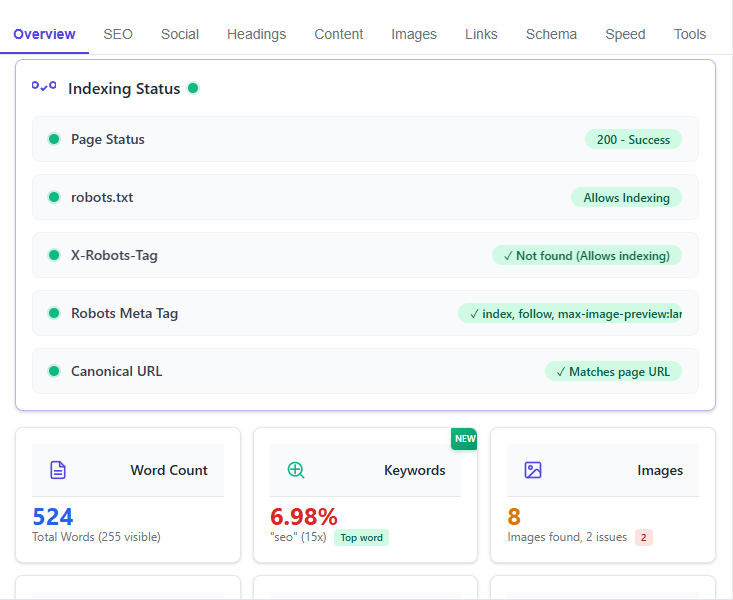
The extension analyzes: meta tags (title, description, robots, canonical, hreflang, author, viewport, lang), social tags (Open Graph, Twitter Card, LinkedIn), heading structure (H1–H6), image alt text, internal and external links, Schema.org structured data, page performance score, content insights (word count, readability, keyword density), and indexing status (robots.txt, X-Robots-Tag, HTTP status code).
Does it work on any website?
Yes. Your site, a competitor’s page, a staging environment, localhost. Any URL Chrome can load. There’s a toggle in the pop-up to disable the extension on specific sites if you don’t want it running somewhere.
How does the AI feature work?
You connect your own API key from Anthropic, OpenAI, Google Gemini, or DeepSeek. The extension sends the page’s SEO data to the model you chose, which reads the actual content and gives you title suggestions, a meta description, and a short list of recommendations specific to that page. Results are cached for 24 hours per page so you’re not burning credits running it multiple times on the same URL.
What is the full-page view?
After the analysis runs, you can click “Full Report” to open everything in a full browser tab. Same data as the popup, but with more room to read through it. The better view for a full audit or a client report.
Does the extension collect my data?
No. The analysis runs entirely inside your browser. Nothing gets sent to our servers because we don’t have any servers involved in the analysis. The permissions the extension requests are limited to reading the active tab and checking HTTP headers for the indexing feature. That’s it.
How is this different from other SEO Chrome extensions?
Most free SEO extensions do one or two things. SEO Action Plan covers the full on-page picture: technical tags, seo tags, heading, image, links, social previews, schema, content metrics, indexing status, all in one pop-up that loads in under a second. The AI feature is optional, but when you use it, it reads your actual page content rather than handing you generic advice.