
When search engines crawl the web, they rely on a simple but powerful signal from every website they visit. That signal is the HTTP Status Code returned by the server. Whenever a browser, search engine bot, or tool requests a webpage, the server responds with an HTTP status code. This code tells the requester whether the page loaded successfully, moved to another location, or encountered an error. For users, these responses usually remain invisible. For search engines, however, they are extremely important.
Search engines such as Google rely heavily on HTTP status codes to determine how they should crawl, index, and interpret webpages. A correct response helps search bots access and index your content properly. An incorrect response, on the other hand, can prevent pages from being indexed or cause important URLs to disappear from search results.
Understanding how HTTP status codes work is therefore essential for website owners, developers, and SEO professionals. Even a minor configuration mistake can significantly affect crawling behavior.
In this guide, we will explore how each HTTP status code affects SEO, how search engine crawlers interpret these responses, and how to easily check HTTP status codes during website auditing.
For quick inspections during SEO audits, tools such as the SEO Action Plan Extension can instantly display the HTTP status header of the current page directly in the browser toolbar above the URL field. This allows you to identify issues much faster when reviewing multiple pages.
What is an HTTP Status Code
An HTTP Status Code is a three-digit number returned by a server when a browser or crawler requests a page. It forms part of the HTTP response header and communicates the result of the request. When someone enters a URL in their browser, the browser sends a request to the web server hosting that page. The server processes the request and returns a response that includes the HTTP status code. This code informs the browser or crawler whether the request succeeded, failed, or requires another action, such as following a redirect.
Although users rarely notice these responses while browsing, search engines rely on them to understand a webpage’s condition before analyzing its content.
Why HTTP Status Codes Matter for SEO
HTTP status codes are more than technical responses between servers and browsers. They act as signals that guide how search engines crawl and index websites. Before a crawler processes any page content, it first reads the HTTP status code returned by the server. That response determines the next action the crawler should take.
If the response confirms that the page loaded successfully, the crawler proceeds to analyze and potentially index the content. If the server returns a redirect or an error, the crawler adjusts its behavior accordingly. Incorrect HTTP responses can create serious SEO problems. Pages that should rank might never be indexed, redirect signals might not pass properly, and server errors can prevent search engines from accessing important content.
Because of this, maintaining correct HTTP status codes across your website is a critical part of technical SEO.
HTTP Status Code Categories
HTTP status codes are grouped into five main categories. Each category represents a different type of server response.
| Status Code Range | Category | Meaning | SEO Impact |
|---|---|---|---|
| 100–199 | Informational | Request received and processing continues | Rarely relevant for SEO |
| 200–299 | Successful | Request processed successfully | Page can be indexed |
| 300–399 | Redirection | Server failed to process the request | Crawlers follow redirect rules |
| 400–499 | Client Errors | Page cannot be found or accessed | Page may be removed from index |
| 500–599 | Server Errors | Page may be removed from the index | Crawling may stop temporarily |
Among these categories, the 200, 300, 400, and 500 ranges are the most important for SEO.
How Search Engine Crawlers Interpret HTTP Status Codes
Search engines use HTTP status codes to instruct how a page should be treated. When a crawler such as Googlebot requests a URL, the first thing it evaluates is the server response. Only after reading that response does the crawler decide what to do next. The action it takes depends entirely on the HTTP status code returned by the server. Depending on the response, a crawler may take several actions.
• Index the page if the response indicates successful access
• Follow a redirect if the page has moved
• Remove the page from search results if it no longer exists
• Retry crawling later if the issue appears temporary
• Stop crawling if the server repeatedly returns errors
This process ensures that search engines can efficiently navigate the web and keep their index up to date.
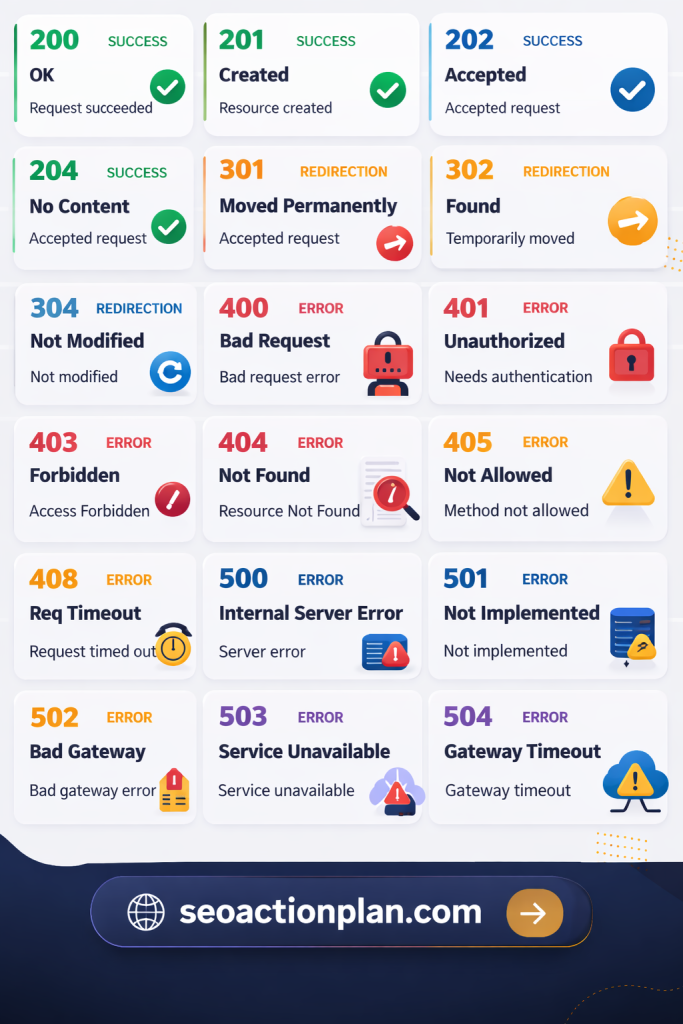
HTTP Status Code List That Matters for SEO
The following table summarizes the HTTP status codes that have the greatest impact on search engine crawling and indexing.
| HTTP Status Code | Category | Meaning | SEO Impact |
|---|---|---|---|
| 200 | Success | Page loaded successfully | The original page usually remains indexed |
| 301 | Redirect | Permanent redirect | Passes ranking signals |
| 302 | Redirect | Temporary redirect | Page removed from the index over time |
| 304 | Cache | Content unchanged | Saves crawl resources |
| 404 | Client Error | Page not found | Faster removal from the index |
| 410 | Client Error | Page permanently gone | Faster removal from index |
| 500 | Server Error | Server failure | Crawling temporarily paused |
| 503 | Server Error | Service unavailable | Crawlers retry later |
Understanding how these responses affect crawling helps prevent technical SEO issues.
200 Status Code (OK)
| Detail | Description |
|---|---|
| Status Code | 200 |
| Name | OK |
| Meaning | Request completed successfully |
| SEO Impact | Page can be indexed |
The 200 status code indicates that a page loaded successfully and the server returned the requested content without any problems. For SEO purposes, this is the ideal response for pages that should appear in search results. When search engines receive this response, they continue processing the page normally.
How Crawlers Handle 200 Responses
Once a crawler receives a successful response, it begins analyzing the page in detail to determine whether it should appear in search results. During this process, the crawler typically performs several actions.
• Rendering the page to interpret the layout and scripts
• Analyzing the content to understand its relevance
• Extracting internal and external links
• Evaluating signals such as quality and uniqueness
• Adding the page to the search index if appropriate
This response allows search engines to fully process and evaluate the page.
Google Search Console Signals
Pages returning a 200 response rarely produce errors in Google Search Console. However, even after indexing, reports may still show warnings if the content does not meet quality expectations.
You may occasionally encounter reports such as:
• Soft 404 warnings
• Crawled but not indexed
• Duplicate page detected
These issues usually relate to content quality rather than the HTTP response itself.
301 Status Code (Moved Permanently)
| Detail | Description |
|---|---|
| Status Code | 301 |
| Name | Moved Permanently |
| Meaning | Page permanently redirected |
| SEO Impact | Transfers ranking signals |
A 301 redirect indicates that a page has permanently moved to a new URL. This status code is commonly used during site migrations, URL restructuring, or when consolidating duplicate pages. Search engines treat this redirect as a strong signal that the original URL should be replaced by the new one.
How Crawlers Handle 301 Redirects
When a crawler encounters a 301 response, it follows the redirect and updates its records accordingly.
In most cases, the crawler performs the following actions.
• Following the redirect to the destination page
• Updating the indexed URL to the new location
• Passing most ranking signals to the new page
• Replacing the old URL in search results over time
Because of this behavior, 301 redirects are considered the best method for handling permanent URL changes.
302 Status Code (Temporary Redirect)
| Detail | Description |
|---|---|
| Status Code | 302 |
| Name | Temporary Redirect |
| Meaning | Page temporarily moved |
| SEO Impact | Original page remains indexed |
A 302 redirect indicates that the page has temporarily moved and may return to its original location later.
Search engines interpret this response differently from a 301 redirect because the change is not permanent.
How Crawlers Handle 302 Redirects
When a crawler encounters a temporary redirect, it still follows the destination URL to retrieve the content. However, it continues treating the original URL as the primary location.
Typically, the crawler will:
• Follow the redirect to access the content
• Keep the original URL in its index
• Monitor the redirect during future crawls
If a temporary redirect remains in place for a long period, search engines may eventually treat it as permanent.
304 Status Code (Not Modified)
| Detail | Description |
|---|---|
| Status Code | 304 |
| Name | Not Modified |
| Meaning | Content unchanged since last crawl |
| SEO Impact | Improves crawl efficiency |
The 304 response indicates that the page’s content has not changed since the crawler’s last visit. Instead of downloading the full page again, the crawler simply uses the cached version it already has.
How Crawlers Handle 304 Responses
When search engines receive this response, they avoid unnecessary downloads and move on to other pages.
In practice, the crawler will usually:
• Skip downloading the page again
• Use the previously stored cached version
• Continue crawling other URLs more efficiently
For large websites, this behavior helps conserve crawl resources.
404 Status Code (Not Found)
| Detail | Description |
|---|---|
| Status Code | 404 |
| Name | Not Found |
| Meaning | Page cannot be located |
| SEO Impact | Page eventually removed from index |
A 404 response means the server cannot find the requested page. This may happen when a page is deleted, the URL changes without a redirect, or the link is incorrect. Although many website owners worry about 404 errors, they are a normal part of the web.
How Crawlers Handle 404 Responses
Search engines do not immediately remove pages after encountering a 404 error. Instead, they revisit the page multiple times to confirm that the content is permanently unavailable. During this process, the crawler usually:
• Attempts to crawl the page again later
• Gradually removes the page from the search index
• Stops passing ranking signals associated with that URL
Eventually, the page disappears from search results if the error persists.
410 Status Code (Gone)
| Detail | Description |
|---|---|
| Status Code | 410 |
| Name | Gone |
| Meaning | Page permanently removed |
| SEO Impact | Faster deindexing |
The 410 response is similar to a 404 error but provides a stronger signal that the page has been intentionally removed.
Because the server explicitly confirms that the page is gone, search engines remove it from the index more quickly.
How Crawlers Handle 410 Responses
When a crawler receives this response, it understands that the content will not return.
In most cases, it will:
• Stop attempting to crawl the page frequently
• Remove the page from search results faster
This response is useful when permanently removing outdated content.
500 Status Code (Internal Server Error)
| Detail | Description |
|---|---|
| Status Code | 500 |
| Name | Internal Server Error |
| Meaning | Server failed to process request |
| SEO Impact | Crawling may temporarily pause |
A 500 error indicates a server-side problem that prevents the server from completing the request.
Unlike client errors such as 404 errors, these errors usually occur due to server misconfiguration, application bugs, or overloaded systems.
How Crawlers Handle 500 Errors
When search engines encounter server errors, they assume the issue may be temporary and try again later.
In most situations, the crawler will:
• Retry accessing the page during a later crawl
• Reduce the crawl rate temporarily
• Pause indexing if the error continues
If the issue persists for a long time, search engines may remove affected pages from their index.
503 Status Code (Service Unavailable)
| Detail | Description |
|---|---|
| Status Code | 503 |
| Name | Service Unavailable |
| Meaning | Temporary downtime |
| SEO Impact | Crawlers return later |
A 503 response indicates that the server is temporarily unavailable. This is the recommended status code when a website is undergoing maintenance. Unlike other errors, this response explicitly tells search engines that the issue is temporary.
How Crawlers Handle 503 Responses
When crawlers receive a 503 response, they usually delay crawling rather than removing the page from search results.
Typical behavior includes:
• Pausing crawling activity temporarily
• Returning later to check if the site is available again
• Keeping existing pages in the search index
Using the correct maintenance response helps protect your rankings during downtime.
How to Check HTTP Status Code
Checking HTTP status code responses is an important part of technical SEO. Fortunately, there are several easy ways to inspect these server responses.
Using Browser Developer Tools
Modern browsers include developer tools that allow you to view HTTP response headers.
To check the response in Chrome:
- Open the webpage
- Right-click and choose Inspect
- Select the Network tab
- Reload the page
- Click the main request
- View the Status Code in the Headers section
Using SEO Tools
SEO professionals often need a faster way to check response codes across many pages.
Tools such as the SEO Action Plan Extension make this process easier by displaying the HTTP status header directly in the browser toolbar above the URL field. This allows you to quickly identify redirects, errors, and successful responses without opening developer tools.
Using Online Header Checkers
Several online tools let you enter a URL and view the HTTP response from the server.
These tools usually display:
• the HTTP status code
• redirect chains
• response headers
• caching information
They are useful when troubleshooting crawling issues.
How HTTP Status Codes Appear in Google Search Console
Google Search Console provides detailed reports that help website owners identify crawling problems.
In the Pages report, HTTP status-related issues appear in several categories.
| Issue | Meaning |
|---|---|
| Not Found (404) | Page does not exist |
| Server Error (5xx) | Server problem occurred |
| Page with redirect | URL redirects elsewhere |
| Soft 404 | Page appears empty despite returning 200 |
These reports help you locate technical issues that may affect search visibility.
Common HTTP Status Code Mistakes That Hurt SEO
Even small configuration mistakes can create problems for search engines trying to crawl your site. One common issue occurs when a page returns a 200 response even though the content is missing. This situation is known as a soft 404 and can confuse search engines. Another mistake involves using temporary redirects when the change is actually permanent. Incorrect redirect types can prevent ranking signals from transferring properly.
Redirect chains are another frequent problem. When a URL redirects multiple times before reaching the final destination, crawlers must follow each step. This slows down crawling and may weaken ranking signals. Server errors can also create serious issues. If search engines repeatedly encounter 500 errors, they may temporarily stop crawling the affected section of the site. Regular technical audits help detect these problems early.
FAQs About HTTP Status Codes and SEO
The most important HTTP status code for SEO is 200, as it indicates that the page loaded successfully and can be indexed by search engines.
Occasional 404 pages are normal and do not harm SEO. However, important pages returning 404 errors should be redirected or restored.
Use a 301 redirect when a page has permanently moved. Use a 302 redirect only when the change is temporary.
You can check HTTP status codes using browser developer tools, online header checkers, or browser extensions such as the SEO Action Plan Extension.
Search bots usually retry crawling pages with temporary errors. If the issue continues for a long time, they may remove the page from their index.
Conclusion
HTTP status codes are a fundamental part of how the web works. Although they operate behind the scenes, they play a critical role in how search engines crawl and index websites. Every time a crawler requests a page, the HTTP status code indicates whether the content is available, moved, missing, or temporarily unavailable. These responses guide the crawler’s behavior and influence how pages appear in search results.
Maintaining correct HTTP responses ensures that search engines can access and interpret your content efficiently. Regularly monitoring these responses also helps identify technical issues before they affect your rankings. By understanding how HTTP status codes affect SEO and how search engine crawlers interpret these signals, website owners can maintain a healthier site structure and improve the chances that their pages will be discovered and indexed.
During technical SEO audits, tools such as the SEO Action Plan Extension can make it much easier to quickly inspect HTTP status codes while browsing pages. Ensuring that every page returns the correct response code is one of the simplest yet most effective steps you can take to support search engine visibility.